
Family Photo AI Prompt: Turn Separate Selfies into One Family Portrait
Turn separate selfies into one realistic family portrait with a complete family photo AI prompt, plus 10 more prompts for ChatGPT, Gemini and Imya and fixes for common problems.
Family Photo AI Prompt: From Separate Selfies to One Portrait
A few separate selfies can hold everything an AI needs to build one real-looking family portrait.
The hard part is the prompt. When merging separate selfies into a family portrait, common problems include missing people, extra people and faces that look like strangers. A clear family photo AI prompt tells the model who is who, where each person belongs and what must stay the same.
This guide fixes that. You'll get one complete family photo AI prompt that names every person, their place and their age, a step-by-step way to use it, and 10 shorter family photo AI prompts for ChatGPT, Gemini and Imya.
From Four Selfies to One Family Photo
| Original Selfies | AI Portrait Example |
|---|---|
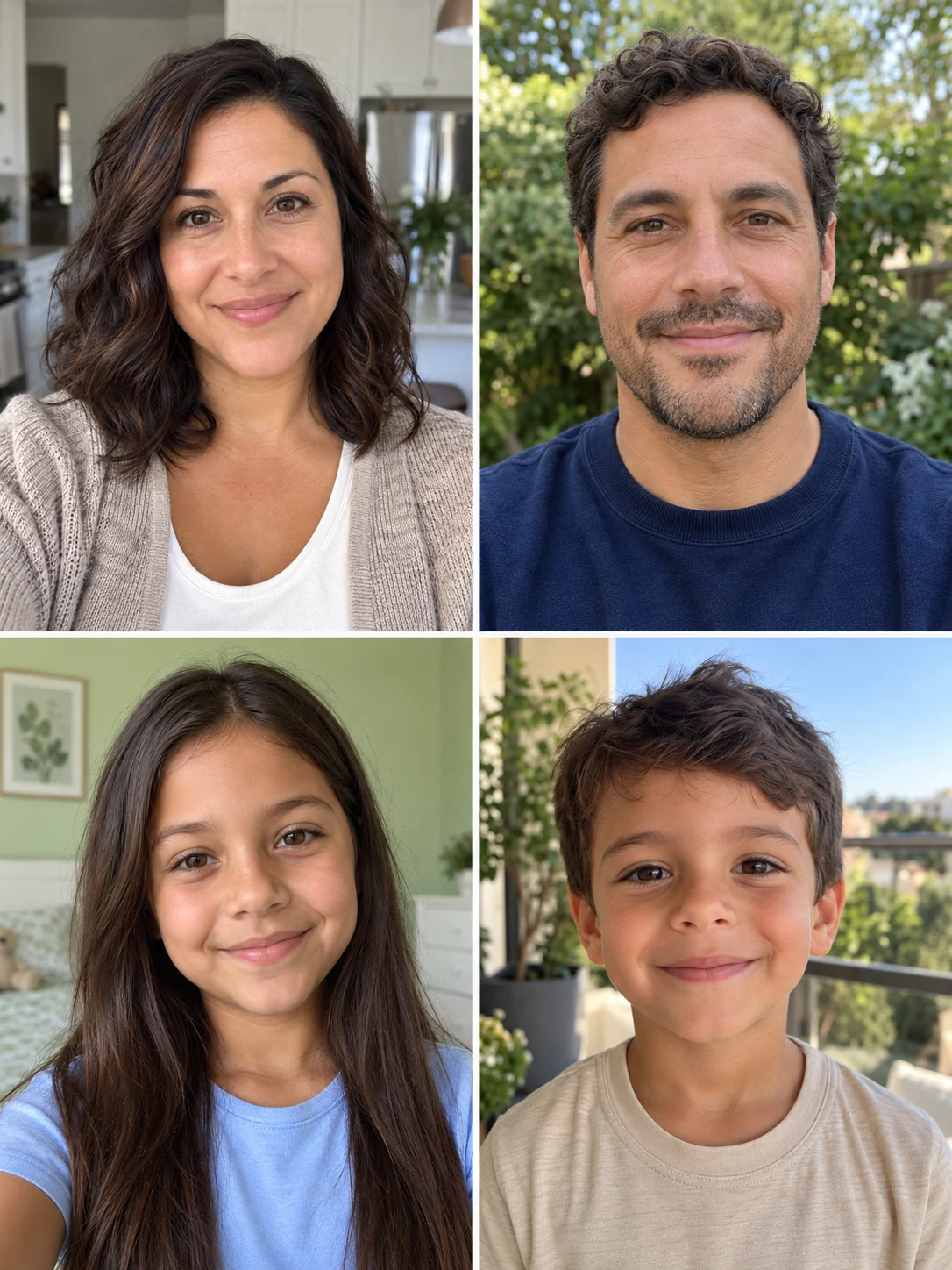 Reference: Four clear, front-facing selfies, one per family member, taken in different places. |
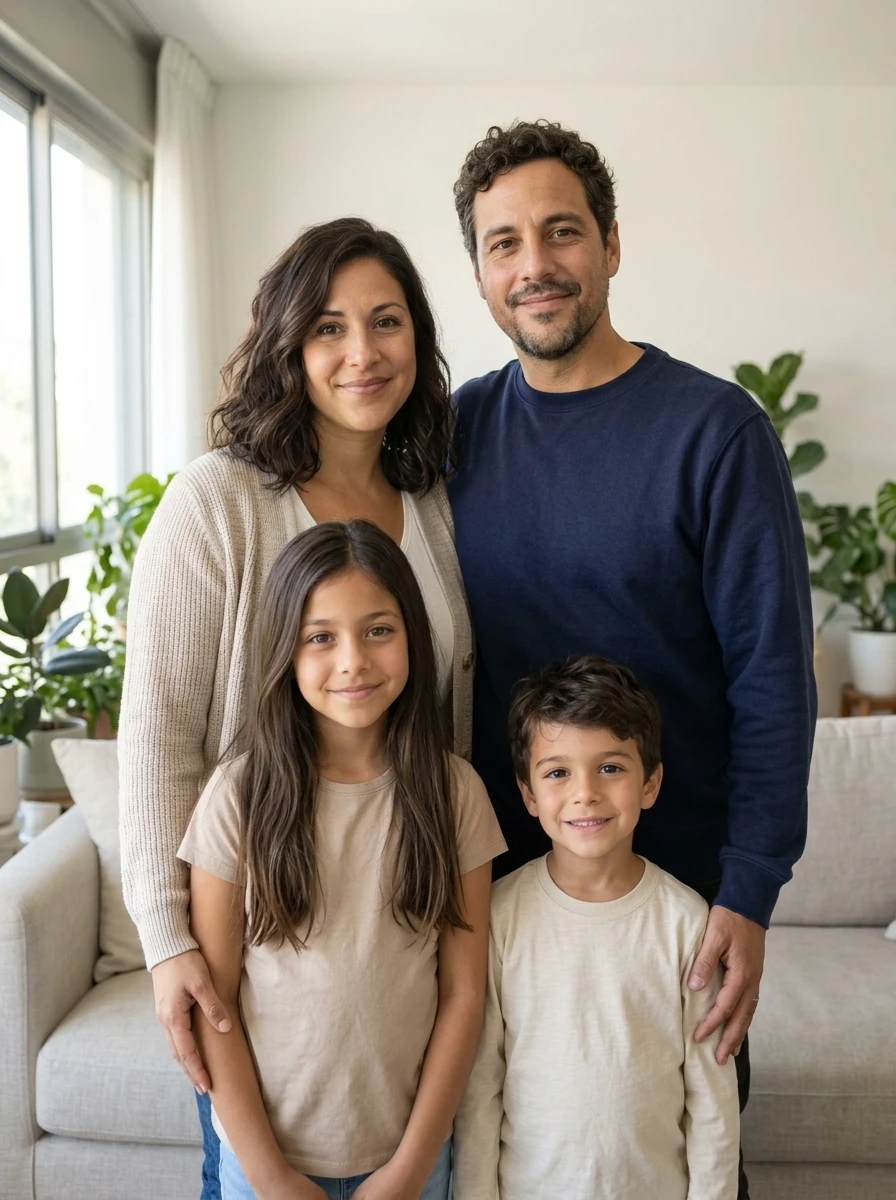 Generated with Imya: One family photo in a bright living room, with every person placed by role and age. |
All people shown are fictional. The separate selfies were created with imagegen; the family portrait was generated in Imya with Nano Banana 2 using those four references and the prompt below, with an added reminder to preserve the reference order.
What This Family Photo AI Prompt Controls
A good family photo AI prompt works like a set of instructions for a photographer. This one controls five things.
Headcount and Roles
The family photo AI prompt says exactly how many people appear and which selfie belongs to whom. "Photo 1 is the mother" leaves nothing for the AI to guess.
Positions and Pose
Parents stand at the back, kids stand in front, shoulders close. A clear layout keeps the picture from looking like a random crowd.
Faces and Ages
Each face should match its selfie, and each person keeps their real age. The prompt tells the AI not to make adults younger or children older.
Outfits and Colors
Coordinated colors make a group shot feel planned. The prompt sets one simple palette and bans logos and text on clothing.
Setting and Light
A bright room, soft window light and a 50mm lens give the portrait a natural, magazine-quality look without distracting backgrounds.
What You Need
Prepare one photo per family member with:
- a clearly visible face looking at the camera;
- good, even light and no heavy filters;
- no sunglasses, hats or hands covering the face;
- the person's natural hairstyle;
- enough resolution to show facial details;
- a note of each person's role and rough age.
Four people is a good size to start. The Imya AI family photo generator accepts 2 to 4 family members at a time.
Step 1: Upload One Selfie per Family Member
Open the AI family photo generator and add one selfie to each upload slot.
Before you generate, decide what must stay the same. For this example, that is:
- each person's face shape and features;
- each person's hairstyle and hair color;
- each person's skin tone;
- each person's real age;
- the order of the photos: mother, father, daughter, son.
Upload the selfies in the same order you name them in the family photo AI prompt.
Step 2: Paste the Complete Family Photo AI Prompt
Use the full English prompt below:
You are an expert family portrait photographer.

Create one photorealistic family photo using the uploaded selfies. Each uploaded photo is one family member. Keep every person's real facial features, skin tone, hairstyle and age. Do not beautify, swap or merge faces.

FAMILY:
A family of four. Photo 1 is the mother. Photo 2 is the father. Photo 3 is the daughter, about 10 years old. Photo 4 is the son, about 6 years old.

POSE:
Parents standing at the back, slightly turned toward each other. The daughter stands in front of the mother and the son stands in front of the father. Everyone close together, relaxed natural smiles.

OUTFITS:
Coordinated outfits in cream, beige and soft navy. Simple fabrics. No logos and no text on clothing.

SETTING:
A bright living room with a large window, a light linen sofa behind them and a few green plants. Clean and uncluttered.

LIGHT AND CAMERA:
Soft natural window light from the left, gentle shadows, 50mm lens, eye-level camera, shallow depth of field.

STYLE:
Warm, natural family photo with a magazine-quality finish. Realistic skin and fabric texture.

STRICT RULES:
Exactly four people. No extra people and no missing people.
Each face must clearly match its uploaded selfie.
Keep each person's real age.
Natural hands.
No text, no watermark, no logo.
Vertical 3:4.
"Each face must clearly match" is a strong instruction, not a guarantee. You still need to check every face before you share the family photo.
Step 3: Generate the Family Photo
Pick the 3:4 aspect ratio to match the family photo AI prompt, check the credit cost shown on the button, and generate.
You can try it directly using the tool on the right.
When the result appears, look at the whole family photo first:
- the right number of people;
- everyone in the right place;
- natural spacing between people;
- one consistent light direction;
- a clean background.
Step 4: Check Every Person in the Family Photo
A nice layout is not enough on its own. Check each person one by one.
Count the People
Make sure the result shows exactly the people you uploaded, with nobody added or left out.
Compare Each Face
Put each face next to its selfie and compare the face shape, eyes, eyebrows, nose, smile, hairstyle and skin tone.
Check the Ages
Children should still look like children, and adults should keep their real age.
Check Hands and Edges
Look at hands on shoulders, overlapping arms and hair edges. These are the most common places for small errors.
| AI Portrait Example | What to Check |
|---|---|
Example photo: Four family members in one scene, placed by role and age. |
Headcount: Exactly four people. Faces: Compare each face with its selfie. Ages: Kids and adults keep their real ages. Details: Hands, hair edges and clothing look natural. |
10 More Family Photo AI Prompts for ChatGPT, Gemini and Imya
Copy any family photo AI prompt below, change the headcount and details, and add the same STRICT RULES from Step 2. Imya accepts 2–4 references; adapt prompts for larger groups before using the tool here.
Realistic Family Photo AI Prompts
1. Three generations
Photorealistic three-generation family photo: grandparents seated in the center on a sofa, two adult children standing behind, three grandchildren sitting on the floor in front, cozy living room, soft afternoon light, 50mm lens, vertical 3:4, no text.
2. Golden-hour backyard
Photorealistic portrait of a family of five on a picnic blanket in a green backyard at golden hour, toddler on mom's lap, candid laughter, warm backlight, 35mm lens, square 1:1, no text.
3. Beach walk
Photorealistic beach portrait of a family of four walking barefoot along the shoreline at sunset, holding hands, white linen outfits, warm golden light, vertical 3:4, no text.
Holiday Family Photo AI Prompts
4. Christmas pajamas
Cozy photorealistic Christmas family photo of a family of four in matching red plaid pajamas on a couch in front of a decorated tree, warm fireplace glow, fairy-light bokeh, square 1:1, no text.
5. Autumn forest
Photorealistic portrait of a family of three walking an autumn forest path, parents swinging a small child between them, orange leaves, soft overcast light, vertical 3:4, no text.
6. New-baby welcome
Photorealistic portrait of two parents and a toddler looking at a newborn wrapped in a cream blanket, bright nursery, soft morning light, square 1:1, no text.
Fun and Art-Style Family Photo AI Prompts
7. Pixar-style 3D
Pixar-style 3D animated scene of a family of four making pancakes in a sunny kitchen, big expressive eyes, bright cheerful colors, square 1:1, no text.
8. Ghibli-style watercolor
Studio Ghibli-style hand-painted illustration of a family of four on a wooden porch under fairy lights at dusk, soft watercolor textures, warm amber palette, square 1:1, no text.
9. Retro 90s mall studio
Intentionally awkward 1990s portrait of a family of five in matching turtlenecks, posed stiffly in front of a laser-beam mall-studio backdrop, on-camera flash, scanned-photo texture, square 1:1, no text.
10. Then and now
Side-by-side image of the same family of four: left, a present-day portrait in a sunlit living room; right, the same family 20 years later with aged parents and grown kids, identical pose and lighting, square 1:1, no text.
Using These Prompts in ChatGPT or Gemini
Each family photo AI prompt here is plain English, so it also works as a ChatGPT family photo prompt or a family photo prompt for Gemini. Attach one photo per person first, then paste the prompt, and check the headcount before you download. Results vary from tool to tool.
How to Fix Common Problems
Someone Is Missing or Added
Add:
The final image must contain exactly four people: the mother, the father, the daughter and the son from the uploaded photos. Do not add or remove anyone.
A Face Looks Like a Stranger
Add:
Each face must use the exact facial features, face shape, hairstyle and skin tone from its own uploaded photo. Do not blend faces between family members.
The Ages Look Wrong
Add:
Keep every person's real age from the uploaded photos. Do not make the adults look younger or the children look older.
The Family Looks Stiff
Add:
Give the family one shared, relaxed action, such as laughing together or leaning in close. Natural body language, no stiff posing.
Hands or Arms Look Wrong
Add:
Keep hands simple and natural. Use fewer overlapping arms and place hands lightly on shoulders or at the sides.
Refine One Problem at a Time
If the layout is right but one face is off, add one line to your family photo AI prompt to fix that face instead of rewriting everything.
If every face is right but the background is busy, simplify the setting instead of rewriting the people.
A focused fix is less likely to break the parts of the image that already work.
Make Your Own Family Photo
Upload one selfie per family member, paste the family photo AI prompt, and check every face before you share it.
Try the Imya AI Family Photo Generator