One Ad, Ten Languages: Video Localization With Seedance 2.5
Turning one Chinese ad into English, Spanish, Indonesian and Malay versions with Seedance 2.5 — presenter and language swapped together. With the full prompts and the accent-control formula.
Localising a video ad has always meant one of two bad options: reshoot in every market, or add subtitles and hope.
The first is expensive. The second converts badly — viewers lose trust when the mouth does not match the words.
There is a case in the Seedance 2.5 manual that made me stop and read it twice. One coffee-machine ad, shot once in Chinese. Then the same ad with an American presenter speaking English, a Spanish presenter speaking Spanish, an Indonesian presenter, a Malaysian presenter — same framing, same pacing, same order of selling points.
Four markets, one source clip, four prompts.
What you get here: the supported languages, how one master cut becomes several market versions, the formula for controlling language and accent, and three details that break a localisation.
1. Which languages
Seedance 2.5 natively supports more than ten:
Chinese · English · Spanish · Indonesian · Malay · Thai · Arabic · Portuguese · Vietnamese · Japanese · Korean, among others
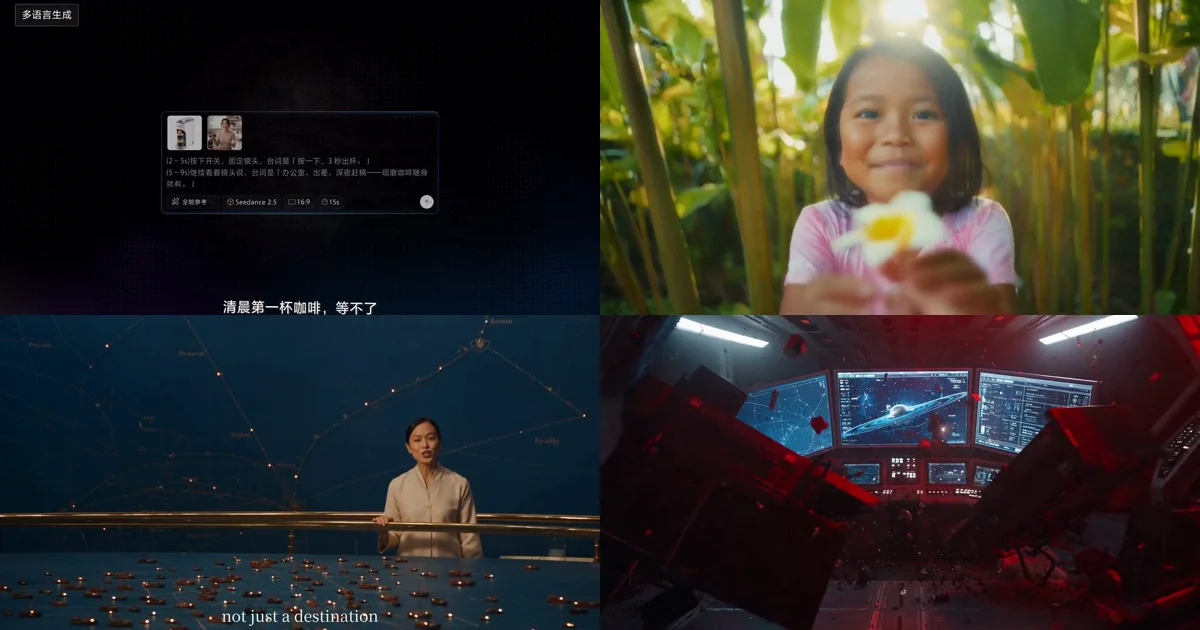
Native is the operative word. This is not dubbing over a finished video — lip sync, pacing and expression all follow the language, and the model can swap in casting that matches it.
How much difference does it make? Look at this multilingual walkthrough:
Viewers may not be able to articulate the difference between dubbing and native generation, but they feel it instantly. A video where the mouth does not match drops a full tier in perceived professionalism.
2. One master cut, four markets
This is the most complete localisation case in the manual. Both prompts, in full.
Step one: make the Chinese master
@image1 is the product shot, @image2 is the presenter and setting. The presenter
gestures with both hands in time with the lines. Expression natural and true.
0-2s: @image2, locked-off camera, the lead speaks to camera in Chinese:
「清晨第一杯咖啡,等不了。」
(2–5s) presses the switch, locked-off camera, line: 「按一下,3 秒出杯。」
(5–9s) still to camera, line: 「办公室、出差、深夜赶稿——现磨咖啡随身就有。」
(9–12s) to camera, line: 「打工人续命神器,限时直降。」
Note the shape of the master: broken into seconds, one line per block. That structure carries through every language version that follows.
Step two: one sentence per market
Replace the person in the video with an American woman and change the voice-over
copy to English.
Replace the person in the video with a Spanish man and change the voice-over copy
to Spanish.
Replace the person in the video with an Indonesian woman and change the voice-over
copy to Indonesian.
Replace the person in the video with a Malaysian man and change the voice-over copy
to Malay.
That is all of it. Four sentences, four markets.
Here is the part people miss: the presenter and the language have to change together.
Swap only the audio and you get an East Asian presenter speaking fluent Spanish. Run that in Spain and the viewer's first reaction is "this was translated for me," not "this was made for me." The entire point of localisation is that the ad should feel native, not imported.
Step three: trailer-style multilingual release
If you only need the language to change and not the cast — a film trailer, a brand film — the prompt gets even shorter:
Change any English in the audio, dialogue, narration and title cards to
French / Japanese, and keep everything else identical.Note that it also changes the title cards. On-screen text is the easiest thing to forget in a multilingual release.
3. Controlling language and accent
Sometimes you write an English line and the model delivers it in Chinese. Or you want Mexican Spanish and get a Castilian accent.
The manual gives a dedicated formula:
Dialogue language + regional variant or accent + delivery + speaker + {the line}
Compare two examples:
Dialogue language: American English. The girl says, in natural conversational
American English: {I thought you weren't coming.}

Dialogue language: authentic Los Angeles American English. A young man says,
in casual LA speech: {No way, you actually made it.}
The second is specific down to the city. The model adjusts the colloquial register, not just the language — how a young Angeleno actually talks is not the same thing as broadcast-standard American.
Always mark the language for non-native lines
The simplest version:
The girl says softly, in Japanese: {もう大丈夫です}Three pieces of information in one line: speaker, delivery (softly), language (Japanese). Drop the language marker and the model guesses from context — and guesses wrong more often than you would like.
The four special symbols
For precise control over audio layers:
| Layer | Symbol | Example |
|---|---|---|
| Music | () | (calm piano plays underneath) |
| Sound effect | <> | <a distant bell> |
| Dialogue | {} | {Hello, welcome back} |
| Subtitle | 【】 | 【Chapter One: Departure】 |
For localisation work, the two that matter most are {} and 【】 — spoken lines and on-screen subtitles are separate things and need separate control.
4. Going further: nine countries in one shot
If what you need is not four separate versions but several markets inside one film, the manual has a more interesting case.
A flower passes from one country to the next — nine scenes, nine languages, each person saying "thank you" in their own as they receive it:
The way the prompt is organised is worth stealing. It states the transition rule once, up front, instead of repeating it in all nine scenes:
Transitions: one person passes the flower out of frame and the next catches it
in a new setting, or use fast whip pans, motion blur and foreground wipes for
seamless transitions. Keep the flower visually continuous across the cuts so the
piece reads as one shot travelling the world.
Then each scene only carries what is different:
Scene 3 【@image3】 a Mexican market, saturated colour, full of life. An older
woman receives marigolds, presses her palms together and says warmly: "¡Gracias!"
The camera sweeps past stalls and crowds and settles on the moment she takes them.
Every scene names which flower, which line, and how the transition happens. That "shared rules first, differences listed after" structure works for any multi-scene prompt.
One presenter, four languages
There is a variant that keeps the cast and switches language by location instead.
The key is aligning the language switch with the scene switch:
0-7.5s Port Model Gallery, English.
7.5-15s Ceramics & Spice Room, Mandarin.
15-22.5s Malacca Trade Gallery, Malay.
22.5-30s Travel Objects Gallery, Japanese.
Timing precise to the half-second, each block binding one gallery, one language, one line. Because the language changes as the room changes, the viewer experiences "walking into the next hall" rather than "the dub suddenly switched."
5. Three details that break a localisation
1. You cannot change the aspect ratio.
In editing mode the output ratio strictly follows the source. If the US market wants horizontal and Southeast Asia wants vertical, you need two separate master cuts — reframing through editing is not available. Plan for that at the production stage, not after.
2. Duration drifts slightly.
The manual says edited output "roughly matches" the source duration, with possible small differences. If your ad platform enforces exactly 15 or 30 seconds, check every language version individually rather than delivering straight out of generation.
3. Do not forget the text inside the frame.
The most commonly missed part of a multilingual release is on-screen subtitles, title cards, and text on packaging. That trailer prompt above explicitly says "change any English in the title cards" — leave that out and you ship a Japanese-audio trailer with English titles.
The Bottom Line
- Presenter and language change together. Swap only the audio and the ad reads as translated. Viewers should feel it was made for them, not converted for them.
- Name the language and accent before the line. Use language + regional variant + delivery + speaker + line, and go as specific as the city — it works noticeably better than naming the language alone.
- Aspect ratio is locked, so decide it at master stage. If markets need different framings, produce separate masters up front.
The real cost of overseas campaigns has never been generation — it is re-organising a production for every market. One master plus one sentence per version changes that ratio, and at campaign scale the difference compounds fast.
Want more prompts you can copy directly? The 51 official prompts are grouped by scenario. For the overall picture of what changed in 2.5, start with the complete guide.
Frequently Asked Questions
Which languages does Seedance 2.5 support?
More than ten natively, including Chinese, English, Spanish, Indonesian, Malay, Thai, Arabic, Portuguese, Vietnamese, Japanese and Korean. Lip sync, pacing and expression follow the language rather than being dubbed over a finished video.
How do you turn one ad into other language versions?
Use the video editing capability, one sentence per market — for example, replace the person in the video with an American woman and change the voice-over copy to English. The key is that presenter and language must change together; swapping only the audio makes a localised ad read as wrong.
What if the model speaks an English line in the wrong language?
State the language before the line. The recommended formula is language, then regional variant or accent, then delivery, then speaker, then the line in curly braces. Naming the language explicitly stops the model guessing from context.
Can I control a specific regional accent?
Yes. The manual's examples go as specific as authentic Los Angeles American English, and the model adjusts the colloquial register accordingly rather than merely switching language.
Can the aspect ratio change between language versions?
No. In editing mode the output aspect ratio strictly follows the source clip. If different markets need different framings, generate separate master cuts rather than trying to reframe through editing.
Do I need separate reference material for each language?
No. One master cut plus a single rewriting prompt produces a market version, preserving composition, pacing and the order of selling points. The material only has to be prepared once.